Saturday, 2 April 2016

Wapka Online User Details Code - 2016

Using Wapka Online users counter, you can display the number of users currently browsing your site with total list. We bring you the code to show you how to add online users counter for your wapka mobile site.


steps to follow:

  • login to your wapka site
  • Select the site from the sites list in which you want to add the users counter
  • Now Click On Edit Site and Jump to any page Like -21 or -5 Or -63 etc
  • Create a new page (edit site- newpage) with title - Online users(: stats-online :)
  • Go Edit Site -> Wml/xhtml
  • Put This Code 

  • Thats all. save and enjoy

Reliance Unlimited Working New 3G Frontqueries For Opera/Uc [April 2016]

Reliance New Working Unlimited 3G Frontquery For OperaMini


Trick - 1
create New Settings:-


apn:- rcomnet
proxy:- 82.145.208.100
port:- 80

Now Open Opera Handler And Put Frontquery:


0.internet.org/cgi-bin/turbo-beta/00/http/


Trick - 2

create New Settings:-


apn:- rcomnet
proxy:- 82.145.208.84
port:- 80

Now Open Opera Handler And Put Frontquery:


0.internet.org/nph-proxy.cgi/op.ph/00/http/

Enjoy Free Internet in opera mini/uc browser handlers with unlimited browsing and downloading support.

Airtel New Working 3G/4G Vpn Trick with Turbo Speed Browsing and downloading [April 2016]

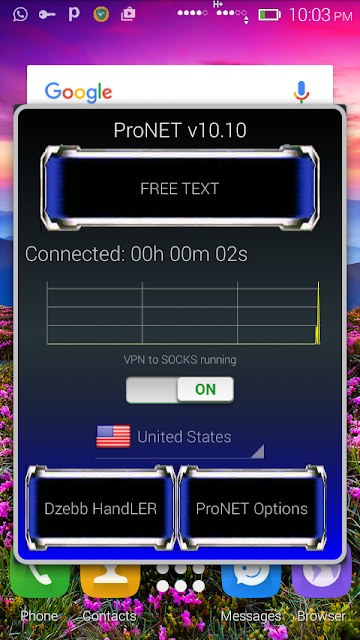
Airtel New Working 3g 4g vpn trick for android users with turbo speed browsing and downloading. working in all over india

Features:
  • 4G Speed Browsing And Downloading.
  • No speed capping issues.
  • no disconnection issues
  • working with default settings.
  • working in 0 balance.
How To Use:
  • Download ProNet Vpn 10.10
  • Now install it and select Yunnel Whole Device mode.
  • click on handler menu and open
  • Now make below settings in handler menu:
Enable Remove Port
Proxy Type - Real Host
Proxy Server - airtel.newshunt.com [or] 25.21.246.114

  • Now Save Settings and start pronet.
  • Enjoy 4g speed browsing and downloading.
  • limit upto 250 mb per host, change free hosts everyday
  • no sim blocking issues at all.


Friday, 1 April 2016

Freecharge FIRSTLL – Get 20% Cashback On Landline Bills Payment Of Rs 200

Freecharge is offering 20% cashback on landline bills payment of Rs 200 or more. This is an amazing offer from freecharge. You can get upto Rs 100 cashback. Offer is valid for new users and offer can be used only once by a user. Offer is valid till 7th April.
Freecharge FIRSTILL - Get 20% Cashback On Landline Bills Payment Of Rs 200

How To Get 20% Cashback On Landline Bills Payment Of Rs 200 :-
1) Download Freecharge App
2) Create new account
3) Initiate Postpaid recharge of Rs 400
4) Enter your details
5) Proceed and apply promo code :- FIRSTLL
You will get a message – Congratulations ! Your Coupon is applied successfully.
6) Pay the amount using debit/credit card only and complete your transaction.
You will get 20% cashback upto Rs 100 in your freecharge wallet within 24 hours.
Terms & Conditions :-
1) Valid on successful first Landline Bill payment done till 7th April 2016
2) Valid on min. transaction of Rs.200.
3) Max cashback of Rs.100
4) FIRSTLL Promocode has to be applied to avail cashback offer
5) Valid on Credit/Debit card, Netbanking and FreeCharge Balance
6) Cashback will be credited to your FreeCharge Wallet which can be redeemed within 185 days from date of credit, and is non transferable
7) Not valid on Virtual Cards & International Cards which are issued outside India
8) Not valid for Add Cash & Airtel Postpaid/Prepaid/DTH
9) We reserve the right to end any or all offers at our discretion without any prior notice

Idea New Working Unlimited 3G Trick For Mobile/Pc Users April 2016

How To Use This Trick In Pc  :

For PC Users :
1. First Go to http://pdproxy.com and make account and download the software in your computer.
2. Now Open The Pd proxy software after Unzip . And Input Your username and password at the time of registration.
3.Now set UDP port in right side of Server & Protocol .
4. Now Most important step In pd Proxy Software Go to setting By clicking Tool option and Go to Proto options and Put in UDP port For 9201 OR 9200 and click on save and Go back button.
5. Now you have Done all the process Just connect Your Modem With Idea internet(apn- internet) setting.
6. After connecting Modem Click on the Connect Button on Pd proxy software.
7. Now wait to connect Pd proxy when it’s show Sucessfully conection message ,you are ready to Surf Free NET.
Note- Currently By using PD PROXY you use 100 mb daily Free. If you want more free use ten you can take premium of PD proxy.

How To Use Free Internet Trick in Mobile:

1. Use Free Internet On Idea Mobile Using This Proxy.
2.Firstly You Will Have To Do This-
3.Go To Your Mobile Sattings.
4.Then Open Network Connection Sattings.
5.Now Create A New Satting Or Connection.
6.Now Enter The Following Details.
Account Name :- Trickglobal
APN:- internet
Proxy Adress:- 186.149.156.119 or 74.3.167.40
Port :- 80
7. Now Save The Satting And Make It Dafult
8. Now you Can Run Free Idea 3g Internet

How To move your blogger blog to wordpress without losing seo

Blogger has been the best blogging platform , especially for the newbies . But blogger has a lot of limitations regarding to seo and customisations. For complete control of our blog , Wordpress is an awesome cms , you have full complete on everything from permalinks i.e  post urls , permalinks , seo features , and loads of optimisation in just a single click . 


How to Migrate Your Blogger Blog To Wordpress ?

1. You need to export your blogger blogs : 
Login to your blogger dashboard , and move to the settings page of your blog . Click on Settings > Other .

Now , Click On Export Blog and Save the xml file of the blog which contains all your blog data including posts and comments.

export blogger to wordpress settings

2. Importing Blogger Posts Data to Wordpress 

Once you have the xml data file , your task is to import them to wordpress admin panel . Login to wordpress dashboard . Click on Tools from sidebar and select Import .


Now , you have to install blogger import plugin to continue the process of importing.Once you see the Import blogger screen , Browse and select the xml file you downloaded from blogger using import tool .

blogger wordpress import save file


3. Managing Wordpress Permalinks Structures

Once , all the posts are imported , now you have to set up the posts permalinks exactly to the blogger style permalinks to keep away from 404 error pages , else we will loose all seo traffic from google and other search engines .

wordpress custom permalinks fro blogger

Copy and enter this url permalink structure - /%year%/%monthnum%/%postname%.html

Now , Save your settings .

Even though We have changed wordpress permalinks to blogger style , still we are not done up completely with it .

Here is a sample Wordpress Url after import :
http://www.tricksglobal.org/how-to-import-your-blogger-blog-without-losing-traffic-seo.html

and here is our original link  :
http://www.tricksglobal.org/how-to-import-your-blogger-blog.html

Though both are same posts , blogger has trimmed the url length , which needs to be fixed to match the original blogger url of our site .

Here is a fix for this :


Create a new php file on your server as fix.php or any name of your choice.


Once , you save it , Open the file in your browser . For eg . http://yoursitename.com/fix.php

This will fix all the url and make it exactly same as the blogger url structure . Now you can search your site in google and click on any links to check if its working or giving any 404 error pages .

Now , you have successfully migrated your blogger blog to wordpress cms without losing any seo traffic , Keeping all the content the same . You now have access to thousands of seo plugins and faetures for every need .

Ebay Mobikwik Offer – Get 6% Off + Rs 50 Cashback On Rs 500 Purchase

Ebay Mobikwik Offer – Ebay had come up with a new offer. Now get 8% off upto Rs 750 and Rs 50 cashback on purchase of Rs 500 or more by using mobikwik wallet at payment page. This is an amazing offer. Offer can be used only once. Offer is valid from 1st April to 15th April.
Ebay Mobikwik Offer

How To Get 6% Off + Rs 50 Cashback Using Ebay Mobikwik Offer :-

2. Select your product
3. Click on Buy
4. Entet your shipping details
5. Proceed to payment page and apply promo code – MOBIEBAY06
(You will get 8% off on your purchase)
6. Select “Mobikwik Wallet” as payment page
7. Initiate paying amount using mobikwik wallet and apply promo code – APRIL50
(You will get Rs 50 cashback on purchase of Rs 500 or more)
8. Pay the amount and complete your transaction.
Terms & Conditions :-
1) Get flat 6% eBay discount on paying with MobiKwik wallet
2) Use discount coupon code: MOBIEBAY06
3) Flat discount of 6% is applicable only for MobiKwik users
4) Maximum discount applicable is Rs. 750
5) MOBIEBAY06 is not applicable on promoted/handpicked deals
6) Use cashback code APRIL50 on MobiKwik payment page to get a flat Rs. 50 cashback
7) Cashback is valid on a minimum purchase of Rs. 500
8) Maximum cashback is Rs. 50
9) Offer valid from 1st April till 15th April, 2016
10) Cashback will be auto-credited to your MobiKwik wallet within 24 hours.
11) Cashback valid once per user during the offer period.
12) MobiKwik offer displayed on merchant site will be valid only if it’s also displayed on MobiKwik Website and App.
13) In case of full (or partial) refund & cancellations, complete cashback will be deducted from the refund.
14) If the order is cancelled or left undelivered at merchant’s end, the merchant (not MobiKwik) will initiate a refund.
15) After the refund is initiated, amount will be credited back to wallet within 7-10 days.